Fourth Task
Make a model of the solar system that shares coordinates
All code can be found here.
The Scrum like control is here.
The task seems simple,it was just described as "do this in WebGL":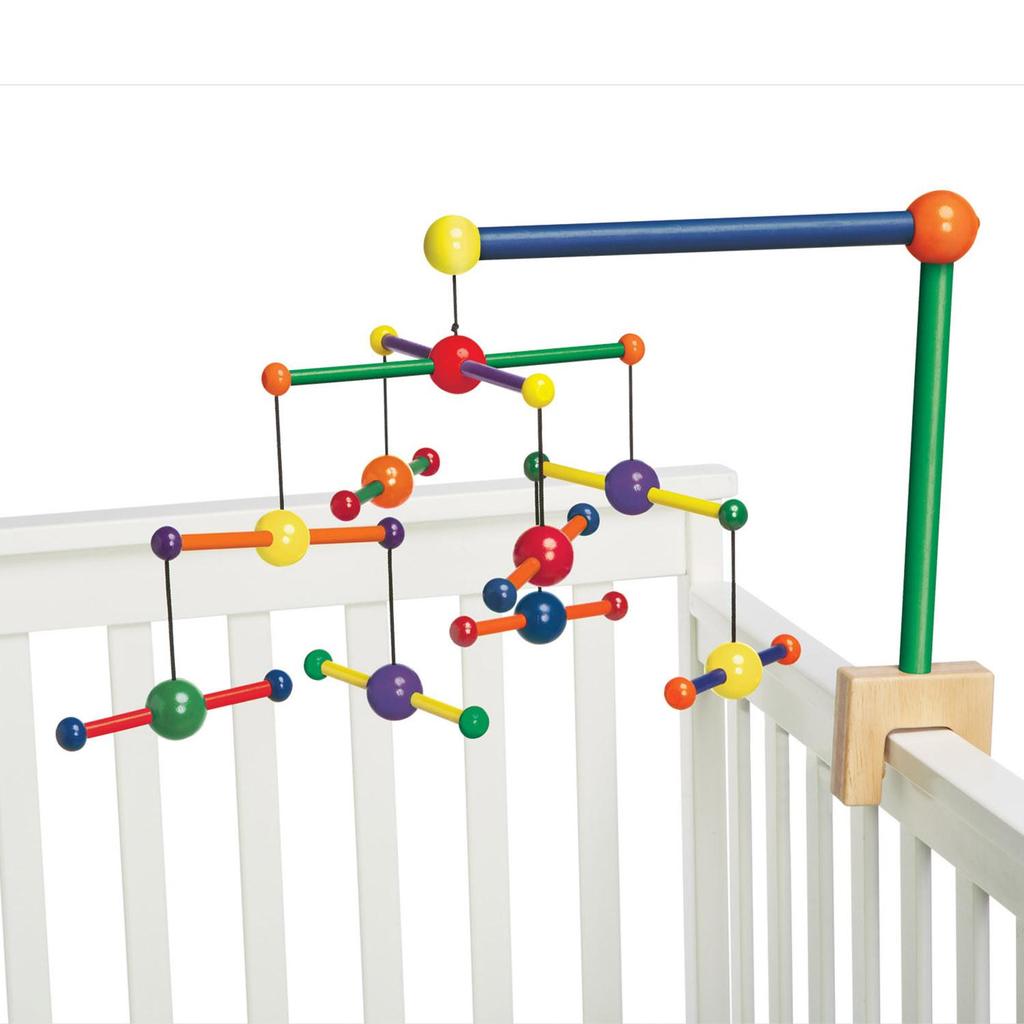 So, the fun part in this how the objects must be connected. The bottommost elements depend on what is happening on the top and everything moves accordingly. This is done by using a matrix stack, which pushes a matrix into a stack and uses the GPU to process the required transformation.
My thought process was: the level are each in a different plane, and the bottom levels depend on the upper level, recursively, so the leaves depend each in all the others; the strings are unnecesary, but would be cool, a single line from element to element.
So off we go by making the first ball, or cube or whatever.
Using the very good explanation on WebGLFundamentals, I created 3 shapes: a cube a cone and a low poly sphere. These 3 float in space and are set around the origin.
Now, the sphere is set in [0,0,0], the other shapes should float around it, as this is the first link in the picture above (red ball, under stick).
I have a function that makes elements rotate on their axis and around the origin:
  function computeMatrix(viewProjectionMatrix, translation, xRotation, yRotation,zRotation, time) {
    var matrix = m4.translate(viewProjectionMatrix,
        Math.sin(time)*translation[0],
        Math.cos(time)*translation[1],
        Math.sin(time)*translation[2]);
    matrix = m4.xRotate(matrix, xRotation);
    matrix = m4.yRotate(matrix, yRotation);
    return m4.zRotate(matrix, zRotation);
  }
This sor of solves the problem of matrix pushing by using the m4 API. First I define the translation, and then I multiply the matrix in sequence by each axis rotation. This in the end is: V*T*xR*yR*zR.
Even though it is not properly pushing the matrixes and popping it, it is a good place to start.
Now, this function is very close to what I need, as each position is defined by a vector, why not try to instead take matrixes as params?
Simple: modularity.
Forcing this function to take matrixes does not allow reusing whatever code was created. A little algebra comes in.
When multiplying matrixes (and vectors) the important thing to hve in mind is how it is an operation that happens on rows and columns, so the size of each and order in which it is done is very important.
Now, we need the actual Matrix Stack, along with the methods that we are gonna use. (In this case, pop is refered as Restore and push as Save, following Gregg's tutorial)
    function MatrixStack() {
        this.stack = [];

        // since the stack is empty this will put an initial matrix in it
        this.restore();
    }

    // Pops the top of the stack restoring the previously saved matrix
    MatrixStack.prototype.restore = function () {
        this.stack.pop();
        // Never let the stack be totally empty
        if (this.stack.length < 1) {
            this.stack[0] = m4.identity();
        }
    };

    // Pushes a copy of the current matrix on the stack
    MatrixStack.prototype.save = function () {
        this.stack.push(this.getCurrentMatrix());
    };

    // Gets a copy of the current matrix (top of the stack)
    MatrixStack.prototype.getCurrentMatrix = function () {
        return this.stack[this.stack.length - 1].slice();
    };

    // Lets us set the current matrix
    MatrixStack.prototype.setCurrentMatrix = function (m) {
        return this.stack[this.stack.length - 1] = m;
    };

    // Translates the current matrix
    MatrixStack.prototype.translate = function (x, y, z) {
        var m = this.getCurrentMatrix();
        this.setCurrentMatrix(m4.translate(m, x, y, z));
    };

    // Rotates the current matrix around Z
    MatrixStack.prototype.rotateZ = function (angleInRadians) {
        var m = this.getCurrentMatrix();
        this.setCurrentMatrix(m4.zRotate(m, angleInRadians));
    };

    // Scales the current matrix
    MatrixStack.prototype.scale = function (x, y, z) {
        var m = this.getCurrentMatrix();
        this.setCurrentMatrix(m4.scale(m, x, y, z));
    };
These functions allow us to add each level of rotation and center without calculating it by hand, and using the GPU. Each level will recieve the position of the previous "center" and rotate around it. The leaves will have each previous center and rotate accordingly. The rotation is done by multiplying the translation value by the sine or cosine of the time, so this is sort of the identity rotation matrix.
//PSEUDOCODE
    matrixStack.save();
    matrixStack.translate(ORIGIN_POSITION_X,ORIGIN_POSITION_Y,ORIGIN_POSITION_Z);
    matrixStack.rotateZ(time);

    matrixStack.save();
    {
        //DRAW
    }
    matrixStack.restore();

    matrixStack.save();
    {
        //DRAW
    }
What we do here is resetting the origin position from which whatever is drawing is to be drawn, going back to the last position and redrawing. What will eventually hapenis that we have nested methods like in the pseudocode to have more levels.
A live version can be found here.