Sixth Task
Follow a trail
All code can be found on github, but the live version is also available on Codepen.
The Scrum like control is here.
For this task we have to make an object non symmetrical animate itself following a defined trail. Gold star for allowing the user to draw the trail. Also, these points must be on a curve, like a Bezier or a NURBS.
The right way to do this is to make it machine independent, which means that the speed of the machine will not make it annoying: a fast machine will not make it end in a single frame and a slow machine will not make it eternal.
For this, we use the UNIX time, which shows the current clock time on the machine, and is sent to the GPU from the CPU everytime we draw a frame. This will allow the object to move along the animation at the intended speed. For example, if the animation is a chess piece moving across a board, the distance it must travel is different for each movement, but it should last around 2 seconds, if moved by a human hand. (Images are from the Pixar short film Geri's Game)

Of course this is not absolute, but the difference in agression is clear.

Now, let's see the code.
var then = 0;

requestAnimationFrame(drawScene);

// Draw the scene.
function drawScene(now) {
  // Convert the time to seconds
  now *= 0.001;
  // Subtract the previous time from the current time
  var deltaTime = now - then;
  // Remember the current time for the next frame.
  then = now;
The first thing to do is skip some work so I copied the folder from the Fifth task, and modified the buttons. This gives me a working WebGL environment and a cone, which I will use to show the trail animation. By deleting the camera changes, setting the target and camera position to the origin, now it's time to animate an object on a trail.
The cone is a very good shape to use, as you can know where the tip is at a glance due to it not bein symmetrical, so it is the chosen shape to use.
The cone has a matrix that defines the colors, which will remain untouched, and a position matrix which will be the one to be modified. The function that defines it is:
    function computeMatrix(viewProjectionMatrix, translation, xRotation, yRotation, zRotation, time) {
        var matrix = m4.translate(viewProjectionMatrix,
            translation[0],
            translation[1],
            translation[2]);
        matrix = m4.xRotate(matrix, xRotation);
        matrix = m4.yRotate(matrix, yRotation);
        return m4.zRotate(matrix, zRotation);
    }
Now, as you can see, we have a rotation parameter, a translation parameter(vector) , the viewProjectionMatrix(which adjusts it to the world and camera position) and the time. We will make it so that when a button is pressed this function recieves the parameter and updates the position or rotates the object.
We have 3 buttons to make the cone move and one to stop it:
In order: the cone will move in an n pattern (inverse u?), the cone will move in an S pattern, the cone will change axis on which to move and the Stop button.
The math behind it is simple: we define a path that should be travelled, say for the n shape, and use the dot product to traverse it in the given axis, that will be defined by a vector $$[1,0,0]$$ and whenever the "Rotar" button is pressed, the 1 will move into the next axis.
Now using bezier.js, we define the path to follow. This path uses the current point in which the object is, an ending point along the plane and a distant point that defines the curvature. (Source here)
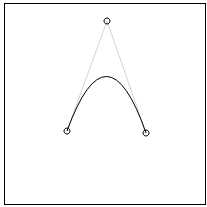
var startingPoint= (x,y,z);
var endingPoint  = (x,y,z);
var curvingPoint = (x,y,z);
var curve = new Bezier(startingPoint , curvingPoint , endingPoint);
var draw = function() {
 drawSkeleton(curve);
 drawCurve(curve);
}
We do the same for the S shape, but with 4 parameters.
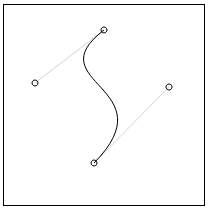
var startingPoint= (x,y,z);
var endingPoint  = (x,y,z);
var curvingPoint1= (x,y,z);
var curvingPoint2= (x,y,z);
var curve = new Bezier(startingPoint , curvingPoint1 , curvingPoint2 , endingPoint);
var draw = function() {
 drawSkeleton(curve);
 drawCurve(curve);
}
This gives us the path to follow, but not the object's orientation; for simplicity, we will use the ending point.
Now, we just have to plug into the matrix the curve as the transformation and it should work.
It didn't as the processor is not aquainted with the bezier library. The modue required is not as an AMD module, which the m4 matrix is. Here is the m4 solution.
(function(root, factory) {  // eslint-disable-line
  if (typeof define === 'function' && define.amd) {
    // AMD. Register as an anonymous module.
    define([], factory);
  } else {
    // Browser globals
    root.m4 = factory();
  }
}