Extra task
Explain code to the class
For this one I will explain Skybox.
The concept is simple: create an object around the camera facing the camera to give the impression of a far away ambient using only a texture. So, paint the landscape around the observer.
This helps a lot to make a world feel big witouth huge computational cost and avoids the "unexplored map" experience.
 It is a simple thing, really: create a cube around the camera and set a texture to give the impression of depth.

And voilá, you have a full scene working. Well, actually, it's not that simple. Here's an example of what happens in the edges, with a cube too small for the camera perspective.
 And a Three.js example where you can see the effect failing if you look close enough.
Computationally speaking, this is amazingly cheap, you just draw the cube once but it has it's drawbacks. For instance, what if the character moves a lot? That's where other tricks are needed.
Now, we have used a cube for all three axes, but what if we have a camera only using two? Think of Mario, he never looks up or down, so a cube with empty top and bottom might work, but you'd still have the corners... So a cylinder works.
 This is a standard panorama picture, that wraps around the cylinder and gives you the same effect without corners.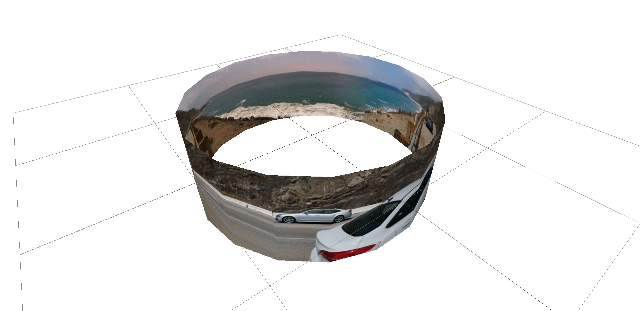
And here's the result.
Of course, you could generate the landscape and make the program draw it, but as it often is, this is just distant objects that the user will never get close to, and is expensive computationally. A better approach is to render it and convert it to a skybox.


This is all very cool but the image is static, what if I need it to change? Of course, change it. This is an example that when morphed will give the impression of day transition. The effect works when the user is not focusing on the scene.

Now, some WebGL code:
//Import the images
    var g_skyBoxUrls = [
        'images/skyposx1.png',
        'images/skynegx1.png',
        'images/skyposy1.png',
        'images/skynegy1.png',
        'images/skyposz1.png',
        'images/skynegz1.png'
        ];
Now, we use the CubeMap API from WebGL to generate the cube.
    function loadTextureCube(urls) {
        var ct = 0;
        var img = new Array(6);
        for (var i = 0; i < 6; i++) {
            img[i] = new Image();
            img[i].onload = function() {
                ct++;
                //Make sure it has the 6 textures loaded
                if (ct == 6) {
                    texID = gl.createTexture();
                    gl.bindTexture(gl.TEXTURE_CUBE_MAP, texID);
                    var targets = [
                        gl.TEXTURE_CUBE_MAP_POSITIVE_X, gl.TEXTURE_CUBE_MAP_NEGATIVE_X,
                        gl.TEXTURE_CUBE_MAP_POSITIVE_Y, gl.TEXTURE_CUBE_MAP_NEGATIVE_Y,
                        gl.TEXTURE_CUBE_MAP_POSITIVE_Z, gl.TEXTURE_CUBE_MAP_NEGATIVE_Z
                            ];
                    for (var j = 0; j < 6; j++) {
                        gl.texImage2D(targets[j], 0, gl.RGBA, gl.RGBA, gl.UNSIGNED_BYTE, img[j]);
                        gl.texParameteri(gl.TEXTURE_CUBE_MAP, gl.TEXTURE_WRAP_S, gl.CLAMP_TO_EDGE);
                        gl.texParameteri(gl.TEXTURE_CUBE_MAP, gl.TEXTURE_WRAP_T, gl.CLAMP_TO_EDGE);
                    }
                    gl.generateMipmap(gl.TEXTURE_CUBE_MAP);
                    drawScene();
                }
            }
            img[i].src = urls[i];
        }
    }
    function setupSkybox() {
        loadTextureCube(g_skyBoxUrls);
    }
_______________
Sources:
- https://medium.com/aol-alpha/how-to-design-vr-skyboxes-d460e9eb5a75
- https://stackoverflow.com/questions/18703399/webgl-skybox-textures-artifacts-on-cube-edges
- https://github.com/simianarmy/webgl-skybox
- https://www.360cities.net/video/godafoss-waterfall-iceland/vr
- http://math.hws.edu/eck/cs424/notes2013/webgl/skybox-and-reflection/skybox.html
- https://estebandalelr.co/codepres2/webgl-skybox/